

A duplicate email or record is a reason to investigate before clicking Resubmit. First establish what happened: did the trigger start two runs, did one run repeat an action, or did the flow react to its own update? Each needs a different fix.
Microsoft documents that Power Automate can produce repeated actions because of its underlying at-least-once execution design. It recommends designing for duplicate inputs. A successful run history entry alone does not establish that the business operation happened only once. See Microsoft’s trigger troubleshooting guidance.
1. Identify which kind of duplication you have
- Repeated trigger or multiple producers: compare distinct run IDs with the source event or record ID. Check for active copies of the flow in other environments that watch the same source.
- A self-triggering loop: the flow updates the record that its trigger watches, creating another qualifying event. Review the changed fields and trigger conditions. Microsoft recommends conditional checks to prevent these infinite trigger loops.
- Repeated work inside a run: inspect loop iterations, input arrays, parallel branches and the action’s retry history. Two emails can come from two matching array entries rather than two trigger events.
- A manual replay: check whether someone already resubmitted the run. Treat that as another attempt at the business operation when investigating the timeline.
Several causes can coexist. For example, a self-triggering flow can also retry a slow connector action. Fixing just the retry setting leaves the loop intact.
2. Capture evidence before changing settings
For one affected operation, assemble a short incident record:
- The source event identifier, affected record identifier and intended business result
- Relevant run IDs, start times, flow version and environment
- The first action that changed an external system, its inputs, outputs and retry attempts
- Destination evidence, such as the created record and its identifier
- Any subsequent edits or resubmissions
Use identifiers rather than copying entire payloads into tickets or logs. Preserve the current flow definition and settings before testing a change.
Compare actual destination identifiers as well as timestamps. Two records with the same business reference support a duplication finding; two runs that safely return the same existing record may show the safeguard working. Write down the difference between the intended result and the observed result before selecting a fix.
A timeout means the caller did not obtain a timely response; the remote operation may already have succeeded. Microsoft’s Retry pattern guidance describes this lost-response failure window. Check the destination before replaying a create, send or increment action. If its outcome cannot be established, mark it unresolved and investigate instead of treating it as a confirmed failure.
3. Protect the business operation with a stable key
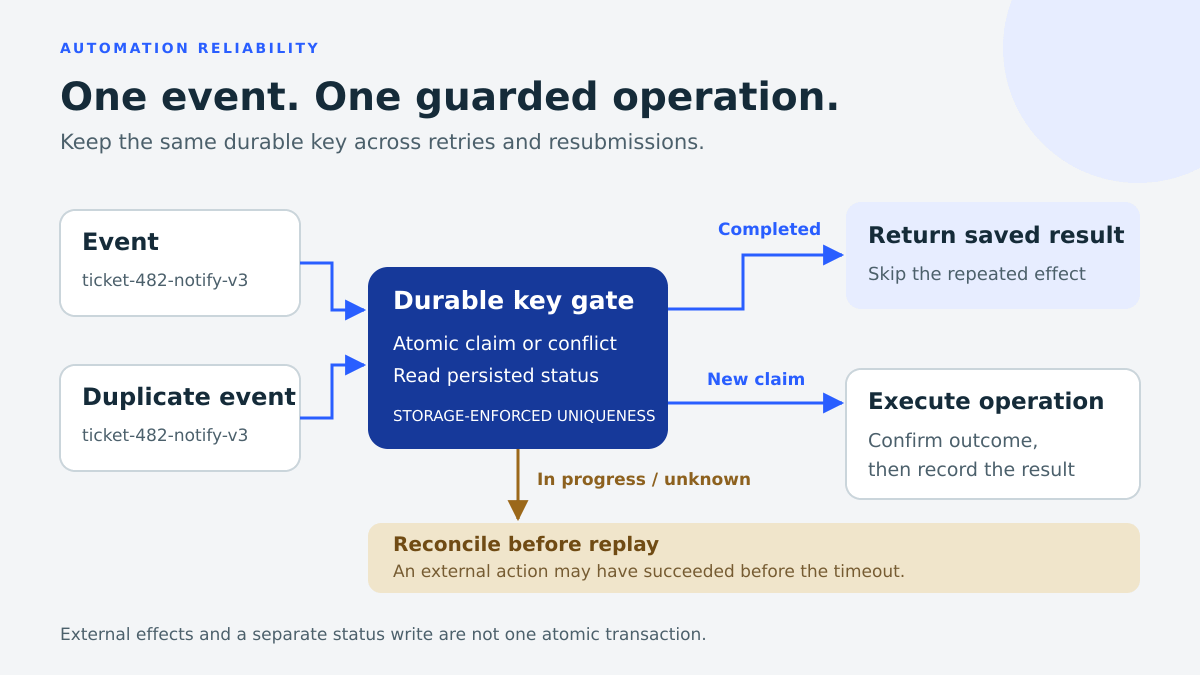
Idempotency means repeating the same logical operation preserves the intended result. Give that operation a stable key that survives retries and resubmissions. For an illustrative notification workflow, ticket-482-notify-v3 identifies one ticket event and notification version. A newly generated run ID would give each attempt a different identity.
Persist the key with the operation’s status and result reference. A completed matching operation can return its recorded result; an in-progress or uncertain operation needs reconciliation. Do not blindly run it again. Microsoft’s Idempotent Consumer pattern explains stable identifiers, durable state and concurrent duplicates.
A lookup followed by create has a race: two runs can both see “missing” before either writes. Use storage-enforced uniqueness or an atomic conditional claim. In Dataverse, an alternate key can enforce uniqueness; verify its index reaches Active before relying on it. See Dataverse alternate-key documentation.
A unique database key does not make sending an email and recording “sent” one atomic transaction. The email could leave before the status write fails. Use a downstream idempotency feature where supported, or reconcile uncertain outcomes. This is a guarded design, not a promise of exactly-once effects across services.

4. Use concurrency and retries for their own jobs
Concurrency controls overlap. Setting trigger concurrency to one serializes runs of that flow, but it does not discard later duplicates or coordinate other flows writing to the same destination. It is not global deduplication.
Review queue capacity before changing concurrency. Microsoft documents waiting-run limits and warns that turning concurrency on cannot be undone without deleting and re-adding the trigger. Retries also consume requests. Check the current Power Automate limits and connector-specific constraints first.
Retry policies help recover from transient faults. Inspect each consequential action’s policy, use bounded attempts, and consider exponential delays where appropriate. Handle persistent errors and unknown outcomes explicitly with scopes and Run after paths. Microsoft’s error-handling guidance covers these controls. Increasing retry counts cannot repair an invalid input or supply a missing idempotency safeguard.
5. Test the failure paths before resubmitting
Use a separate test environment and synthetic records. The following is a proposed test plan, not a report of a customer deployment:
- Normal event: confirm the expected record or notification and a recorded outcome
- Sequential duplicate: repeat the same key; confirm the completed operation is recognised
- Concurrent duplicate: submit the same key simultaneously; verify only one claim succeeds
- Lost response: simulate success at the destination followed by a timeout; verify reconciliation prevents a blind repeat
- Self-update: update the watched record from the test flow; confirm the intended trigger condition stops recurrence
- Legitimate new event: use a new event version; confirm deduplication does not suppress valid work
- Conflicting payload: reuse an existing key with different content; require investigation rather than silently treating it as the same request
Microsoft supports Flow Checker, test runs and static results for isolated testing. Mocks help validate branches, but destination-level concurrency needs an integration test. Its resubmission guidance specifically warns about duplicate records and emails, input validity and flow-version changes.
The final check
Resubmit only when you can explain the original failure, establish what already completed and show how another attempt will handle that state. Keep the evidence and expected outcome with the recovery decision. If the effect remains uncertain, reconcile it first.
For help reviewing an automation’s failure paths, explore Novvor’s technology consulting services (page in Spanish).


